
 Written by
 Understanding Vibe Coding Tools (IDE vs Assistant vs Agent)
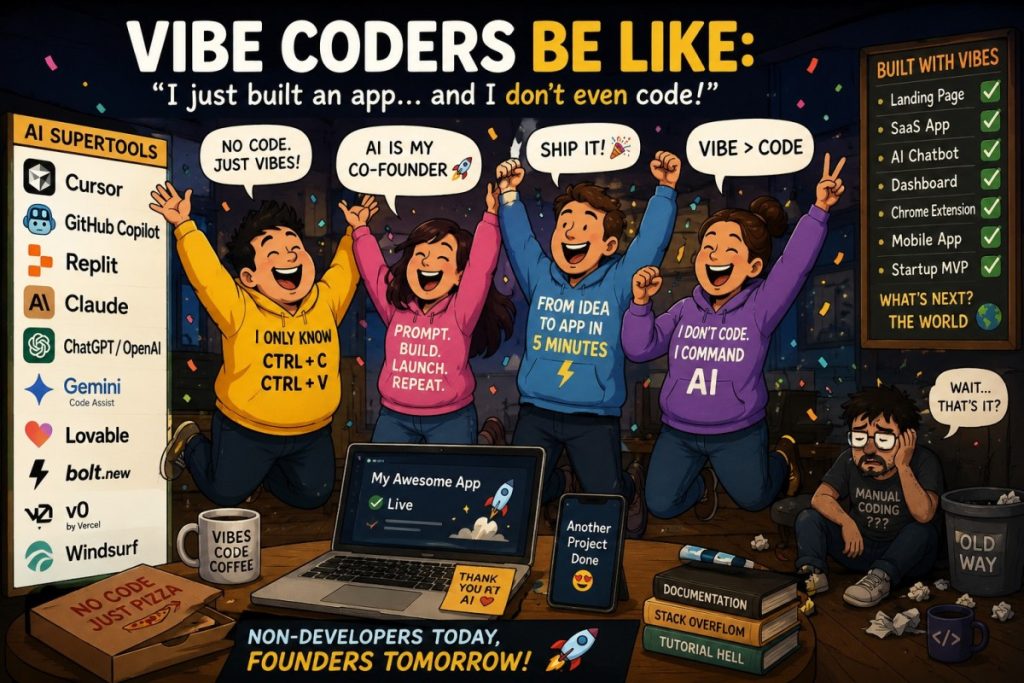
Vibe coding tools are not one single category. They are a stack of different AI systems that help you build software using natural language instead of traditional manual coding.
To understand them properly, you must split them into four layers:
- IDEs (where coding happens)
- AI assistants (help inside IDEs)
- Agentic AI tools (AI that performs tasks)
- App builders (AI that creates full apps)
Each layer has different pricing, strengths, and use cases.
💻 1. IDEs (Integrated Development Environments)
An IDE is the main workspace where developers write, run, and manage code. Traditional examples include VS Code, but modern vibe coding IDEs now have AI built in.
🟢 Cursor
Cursor is an AI-first IDE built on VS Code.
- Price: ~$20/month
- Free alternative: VS Code (no AI), Windsurf free tier
- Why developers use it:
- Edit entire codebases using chat
- AI understands multiple files
- Great for real production projects
👉 Best for: professional developers and startups
👉 Strength: balance between control + AI
🟣 Windsurf
A newer AI IDE focused more on automation.
- Price: ~$15–20/month
- Free alternative: VS Code + extensions
- Why developers use it:
- More agent-like behavior
- Can apply changes across multiple files
- Faster than traditional workflows
👉 Best for: developers who want more automation than Copilot
🟡 Replit (Cloud IDE)
A browser-based IDE.
- Price: ~$25/month
- Free alternative: Replit free tier
- Why developers use it:
- No setup required
- Run code instantly in browser
- AI builds and deploys apps
👉 Best for: beginners and rapid prototyping
🤖 2. AI Coding Assistants (Copilots inside IDEs)
These tools do NOT replace IDEs — they sit inside them and help you write code faster.
🔵 GitHub Copilot
- Price: ~$10/month
- Free alternative: limited Copilot free tier + open-source extensions
- Why developers use it:
- Fast autocomplete
- Works in VS Code, JetBrains
- Extremely stable and widely adopted
👉 Best for: everyday coding and beginners
🟢 Google Gemini Code Assist
- Price: Free tier + paid enterprise usage
- Free alternative: Gemini web tools
- Why developers use it:
- Google ecosystem integration
- Helps with debugging and suggestions
- Strong cloud support
👉 Best for: Android + cloud developers
🟣 Amazon Q Developer
- Price: ~$19/month (varies by usage)
- Free alternative: AWS free tier tools
- Why developers use it:
- Deep AWS integration
- Helps build cloud systems
- Enterprise-focused
👉 Best for: cloud infrastructure engineers
🤖 3. Agentic AI Tools (AI that acts like a developer)
These are the most powerful tools because they don’t just suggest code — they perform multi-step tasks autonomously.
🧠 Claude Code (Anthropic)
- Price: ~$20/month (Pro plan access)
- Higher usage: $100–$200/month tiers
- Free alternative: Claude free tier (limited usage)
- Why developers use it:
- Reads entire codebases
- Fixes bugs across files
- Strong reasoning ability
👉 Best for: debugging and large systems
🧠 OpenAI Advanced Coding Tools (ChatGPT Canvas / o-Series)
- Price: ~$20/month (Plus) or $200/month (Pro)
- Free alternative: ChatGPT free tier
- Why developers use it:
- Explains code deeply
- Generates full applications
- Helps design architecture
👉 Best for: learning + full-stack generation
🧠 Devin (Cognition)
- Price: ~$20–$500+ depending on usage
- Free alternative: none
- Why developers use it:
- Acts like an AI software engineer
- Can complete full tasks
- Still early but very advanced
👉 Best for: automation-heavy workflows
🧠 Google Antigravity
- Price: Not fully standardized yet (often bundled in Google ecosystem)
- Free alternative: Google AI Studio (limited usage)
- Why developers use it:
- Multi-agent app building
- End-to-end automation
- Deep integration with Firebase + cloud
👉 Best for: full app generation inside Google stack
🌐 4. App Builders (Prompt → Full Application)
These tools remove traditional coding almost completely.
🟢 Lovable
- Price: ~$20–30/month
- Free alternative: limited trial tier
- Why developers use it:
- Full-stack apps from prompts
- Handles backend + frontend automatically
👉 Best for: startups and MVPs
🟡 Bolt.new
- Price: ~$20/month
- Free alternative: limited token free tier
- Why developers use it:
- Instant app generation
- Very fast prototyping
👉 Best for: hackathons and quick ideas
🔵 v0 (Vercel)
- Price: ~$20/month
- Free alternative: free tier available
- Why developers use it:
- Generates UI components (React)
- Production-ready frontend code
👉 Best for: frontend/UI design
⚖️ Why IDEs, Assistants, and Agents are different
💻 IDE = workspace
Where you actually write and run code
🤖 Assistant = helper
Helps you inside IDE (autocomplete, suggestions)
🧠 Agent = worker
Does full tasks (build, debug, refactor)
🚀 Builder = shortcut
Turns idea into full app automatically
🧠 What developers actually prefer (real usage pattern)
Most developers don’t use just one tool — they use a stack:
🔹 Professional developers
- Cursor ($20)
- Copilot ($10)
- Claude Code ($20)
👉 Focus: control + production safety
🔹 Startup builders
- Replit ($25)
- Lovable ($20–30)
- Bolt ($20)
👉 Focus: speed + MVP building
🔹 Advanced AI adopters
- Claude Code
- OpenAI agents
- Google Antigravity
👉 Focus: automation + full task delegation
📊 Free vs Paid Summary
🟢 Free options
- VS Code (no AI)
- GitHub Copilot free tier (limited)
- Windsurf free tier
- Replit free tier
- v0 free tier
- Claude / ChatGPT free versions
💰 Paid tier reality
Most tools cluster into:
- $10/month → Copilot
- $15–25/month → Cursor, Replit, Lovable, Bolt
- $20–100/month → Claude Code / OpenAI advanced usage
- $200+ → heavy agentic AI users
Here are well-known types of projects and actual examples of what people are building with them today:🚀 1. Startup SaaS products (most common real use case)
A huge number of modern SaaS startups are now “AI-built MVP first, humans scale later.”
Examples of what gets built:
- AI CRM tools
- Subscription dashboards
- Analytics platforms
- Marketing automation tools
- Job boards
- Micro-SaaS apps
Real-world pattern:
- Built with Cursor + Supabase + v0
- Or Lovable / Replit AI full-stack generation
Why this matters:
Many early-stage startups now reach:
- working MVP in 1–7 days instead of months
👉 This is the biggest real-world impact of vibe coding tools.
🧑💻 2. Developer tools (meta-products)
Ironically, developers use AI tools to build better developer tools.
Examples:
- Code formatters
- API testing tools
- Git automation tools
- Internal dev dashboards
- AI prompt managers
Built with:
- Cursor
- Claude Code
- OpenAI coding agents
👉 This category is growing fast because developers understand the tools deeply.
🌐 3. AI wrapper apps (very popular category)
These are apps that wrap AI models into useful interfaces.
Examples:
- “ChatGPT for lawyers”
- “AI resume builder”
- “AI pitch deck generator”
- “AI stock summarizer”
- “AI customer support bot”
Built with:
- v0 (UI)
- OpenAI APIs
- Lovable / Bolt
👉 Many of these are already making revenue quickly.
📊 4. Analytics & data dashboards
A lot of business tools are now AI-generated.
Examples:
- SaaS dashboards (user analytics, revenue tracking)
- Trading dashboards
- Marketing performance dashboards
- IoT dashboards
Built with:
- Cursor
- Copilot
- Replit AI
👉 AI is mainly used to:
- generate frontend dashboards
- connect APIs
- build backend logic faster
🛠️ 5. Internal tools for companies
One of the most important hidden uses.
Examples:
- HR systems
- Inventory management tools
- Customer support dashboards
- Sales tracking systems
Built with:
- Copilot (enterprise)
- Cursor
- Amazon Q Developer
- Gemini Code Assist
👉 Companies don’t always publicize these, but this is where AI coding saves the most money.
🎮 6. Games and interactive apps
Yes—vibe coding tools are also used for games.
Examples:
- Simple browser games
- Multiplayer mini-games
- AI-generated story games
- Interactive simulations
Built with:
- Replit AI
- Cursor
- Claude Code
👉 Indie developers especially use this for rapid prototyping.
📱 7. Mobile apps (Android + iOS)
Examples:
- Habit trackers
- Fitness apps
- Finance trackers
- AI chat apps
- Productivity tools
Built with:
- Google Android Studio + Gemini
- Cursor
- Replit backend + Flutter/React Native
👉 Google ecosystem is strong here.
🧠 8. Open-source projects built faster with AI
Developers use AI to:
- create libraries
- fix GitHub issues
- build tools faster
- maintain large repos
Examples:
- JavaScript libraries
- Python automation tools
- CLI tools
- DevOps scripts
Built with:
- Claude Code (very strong here)
- OpenAI coding agents
- Copilot
⚡ 9. Landing pages + marketing sites (very common)
This is one of the MOST widely used cases.
Examples:
- Startup landing pages
- Product launch pages
- Portfolio websites
- Marketing funnels
Built with:
- v0 (very popular)
- Bolt.new
- Lovable
👉 These can be generated in minutes.
🧠 10. AI-native apps (next-generation category)
These are apps where AI is the core product.
Examples:
- AI meeting summarizers
- AI research assistants
- AI writing tools
- AI coding assistants
- AI agents for workflows
Built with:
- OpenAI tools
- Claude Code
- Google Gemini Code Assist / Gemini ecosystem
👉 This is the fastest-growing category right now.
📊 Why these tools enable all this
Because they remove 3 major barriers:
1. Boilerplate coding
No need to write repetitive code
2. Full-stack complexity
AI generates frontend + backend together
3. Debugging time
Agents fix multi-file issues
🧠 Real insight (important)
Most “serious” products today are not:
100% AI-built without humans
Instead they are:
AI-built foundation + human refinement
🔥 Final takeaway
Vibe coding tools are already being used to build:
- SaaS startups (fast MVPs)
- AI wrapper businesses
- Developer tools
- Dashboards and enterprise systems
- Mobile apps
- Games
- Landing pages
- Internal company software
👉 The biggest shift is:
Ideas now become working software in days, not months